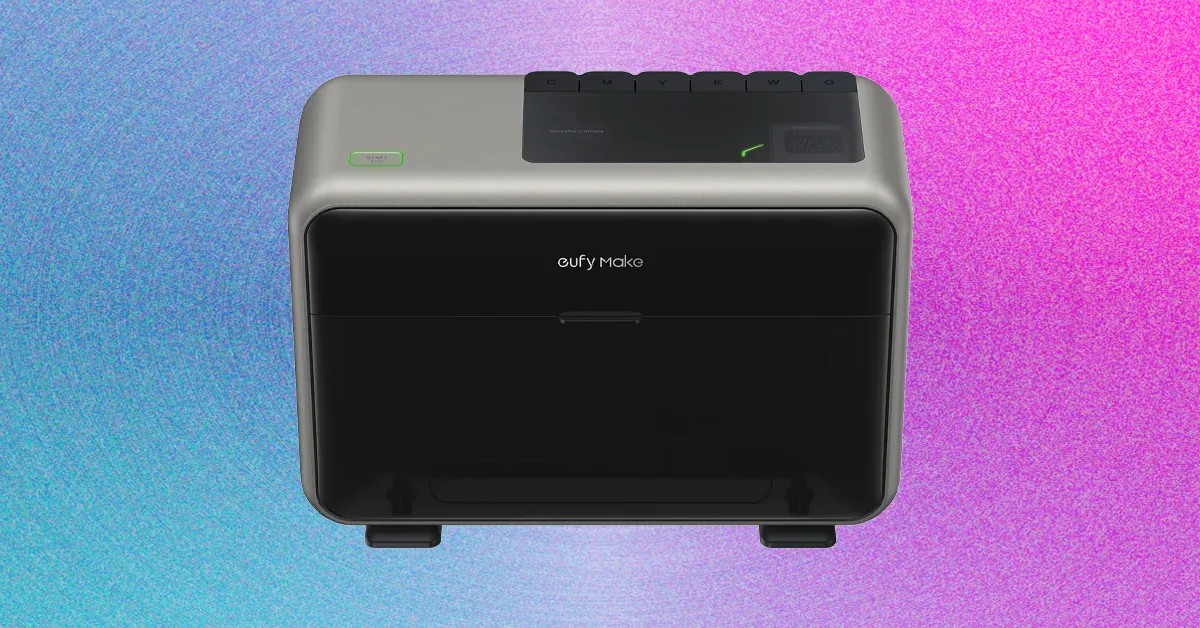
The eufyMake E1 from Anker represents a significant departure from traditional home printing. While standard inkjet or laser printers are designed for paper—handling documents, labels, and photos—the E1 is a compact UV flatbed printer capable of applying durable, textured ink directly onto rigid surfaces like ceramic, metal, wood, and plastic.
It is not a 3D printer in the traditional sense of extruding plastic to build objects layer by layer. Instead, it uses ultraviolet light to instantly cure special ink, creating raised, tactile textures that mimic professional-grade manufacturing. The result is a device that can transform plain mugs, magnets, and keychains into polished, commercial-quality products with remarkable detail.
However, the E1 is not a casual hobbyist toy. With an initial price tag exceeding $2,000 and significant ongoing maintenance costs, it is best suited for entrepreneurs, small businesses, or serious crafters looking to launch a product line. For the average consumer, it is a specialized tool—more akin to a high-end power tool than a household appliance.
How the Technology Works
The printing process on the E1 is streamlined through a combination of hardware adapters and intuitive software, though it requires a learning curve for those unfamiliar with design principles.
Setup and Calibration
- Preparation: Objects are secured to the printer bed using adhesive mats. While these mats are inexpensive, taping around the edges of your item is recommended to catch overspray.
- Alignment: The EufyMake app uses the printer’s built-in camera to detect the object’s position and dimensions. Users verify these measurements in the EufyMake Studio software, aligning their digital design with the captured image to ensure precise placement.
- Printing: The printer applies layers of UV-curable ink. Each layer is instantly hardened by UV light, allowing for the accumulation of texture and depth.
Software Experience
The EufyMake Studio software is generally user-friendly for those with basic design experience.
* For Beginners: Understanding concepts like layers, transparency, DPI (dots per inch), and image formats is essential. The software provides presets for different materials, which helps reduce trial and error.
* For Experienced Users: The interface supports complex editing, including opacity adjustments and multi-layer management.
* Content Library: The app offers a shared community section. The Projects tab showcases user-created designs (such as custom keyboard keycaps and jewelry), offering inspiration and editable templates. The Designs tab, however, is less curated, containing a mix of useful templates and irrelevant AI-generated content.
Print Quality
Despite its compact size (23 x 10 x 16 inches ), the E1 produces professional results.
* Graphics: Clean, high-contrast graphics yield the best results. Raised text and borders feel smooth and substantial, indistinguishable from factory-made items.
* Photos: With a resolution of 1,440 dpi, the printer handles photographic detail exceptionally well. However, combining photos with textured elements may require manual masking and adjustment in the software to achieve seamless integration.
Operational Requirements and Safety
Using the E1 involves specific environmental and safety considerations that distinguish it from standard office printers.
- Ventilation: The printing process releases fumes with a distinct “freshly manufactured” odor. While the printer includes a fan and filter, adequate ventilation is crucial. Printed items should be aired out near a window or fan for a day or two to allow odors to dissipate.
- Safety Precautions: Although Anker states the device is safe to walk past during operation, the UV light can be harmful to eyes and skin. Users are advised to wear the included blue-light-reduction glasses if observing the print process closely and to keep children and pets away from the machine while it is running.
- Space: Due to ventilation needs and safety protocols, the E1 is best situated in a dedicated, secluded area—such as a garage or spare room—rather than a shared living space.
Accessories: Expanding Capabilities
Anker offers two key accessories to enhance the E1’s versatility, each priced at $400 :
- DTF Laminator: This accessory allows users to print onto transfer sheets, which can then be applied to irregular or curved surfaces that do not fit directly on the printer bed. It offers greater flexibility but requires manual application of the transfers.
- Rotary Adapter: Designed specifically for cylindrical objects like mugs, tumblers, and jars. It integrates with the printer’s camera system for precise alignment and offers a more consistent, hands-off printing experience for round items.
Most users will likely need only one of these accessories, depending on whether they prioritize versatility (laminator) or consistency with cylindrical products (rotary adapter).
The True Cost of Ownership
The initial purchase price of the E1 is only the beginning of its financial footprint. Ongoing costs are driven by proprietary ink and mandatory maintenance cycles.
Ink Consumption
The printer uses six proprietary ink cartridges (White, Yellow, Magenta, Cyan, Black, and Clear), each costing $43 for 100ml.
* White Ink Dominance: White ink is used as a base coat and for building texture. It is consumed significantly faster than other colors. For example, printing a full-wrap design on an 18-ounce tumbler uses approximately 2.48ml of total ink, with 2.22ml being white.
* Efficiency Tips: Printing on white or light-colored materials reduces the need for white ink. Strategic design choices can also minimize ink usage.
Maintenance Costs
The E1 requires regular maintenance to prevent clogging, which consumes ink even when not printing:
* Idle Periods: If unused for 12 hours, the printer cycles 0.2ml of each ink color (costing ~$0.50).
* Daily Cycle: If unused for 24 hours, it cycles 0.33ml of each color (costing ~$0.86).
* Long-Term Storage: If shut down for days or weeks, restarting the machine requires a 1.5ml ink purge before printing can resume.
Key Insight: The printer effectively “costs money to sit idle.” To maximize efficiency, users should batch their printing jobs, running the machine continuously for a day or two before shutting it down for extended periods.
Conclusion
The eufyMake E1 is a powerful, professional-grade UV printer that brings factory-quality customization to a desktop size. It excels at producing detailed, textured prints on a wide variety of materials, making it an excellent tool for small businesses, online retailers, and serious hobbyists looking to create unique merchandise.
However, its high initial cost, significant ongoing ink expenses, and need for dedicated ventilation and safety measures make it impractical for casual home use. It is an investment best justified by the potential for commercial return or a high volume of personal projects. For those willing to manage its operational complexities, the E1 offers a compelling way to bring custom manufacturing into the home garage.